Why it exists
My Canon EOS 7D was sitting on a shelf until I made it the camera in a DSLR film-scanner setup. To preview and control the shots from my Mac I'd normally reach for Canon's EOS Utility, but the 7D only works with EOS Utility 2. That one's older, and it doesn't behave well on recent macOS. You get missing labels, and warnings from macOS that it won't run in future versions.
I also wanted a couple of features aimed at film scanning. So I built this, with a lot of help from my AI assistant. It's a personal project. It scratched my own itch and helped a friend with a 70D, and maybe a few other people will find it useful too.
And if you're curious about the whole at-home process this fits into, I wrote up how I develop and scan film at home.
What it does
The handful of things that actually matter for the way I use it.
-
Live preview
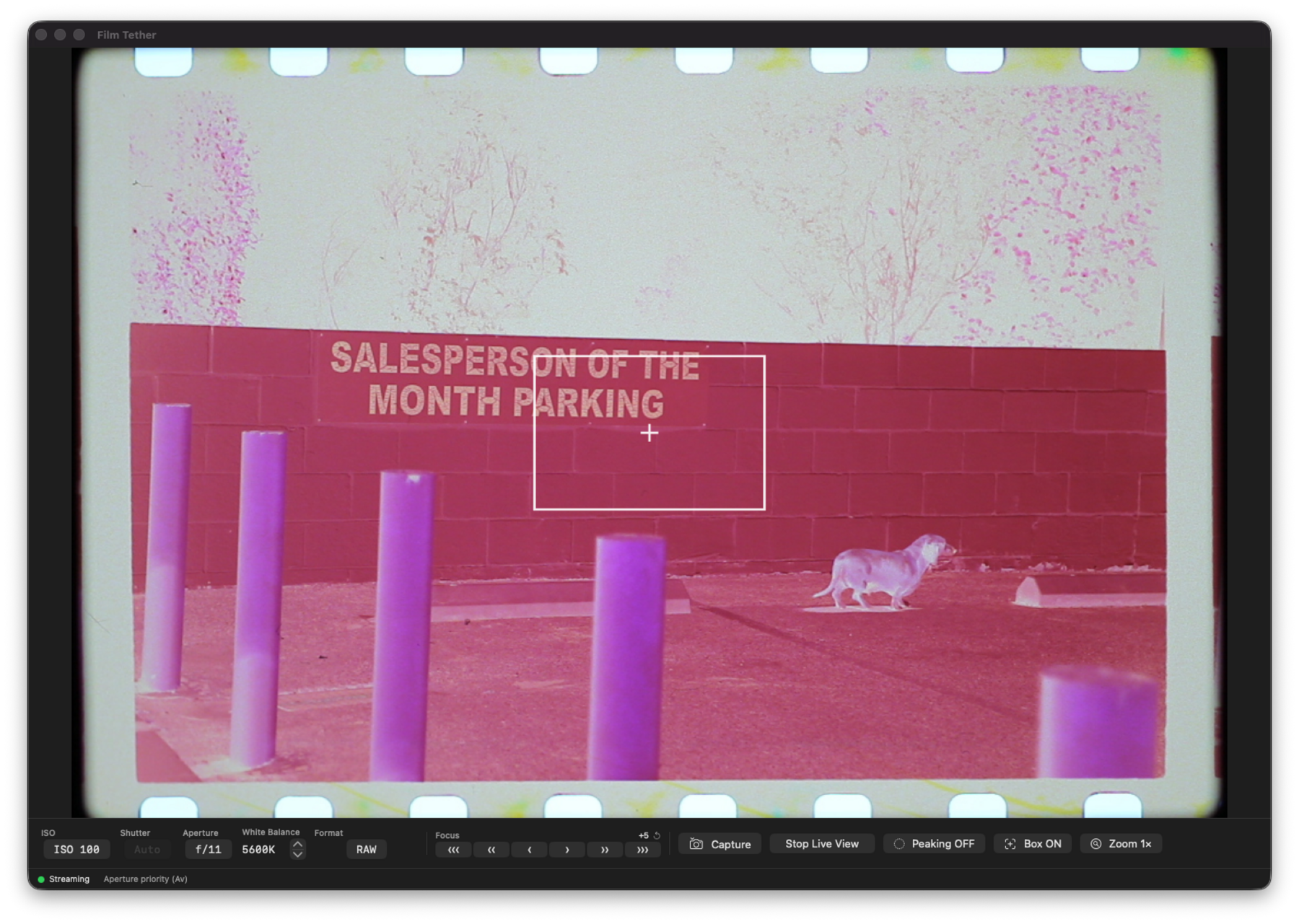
Standard tethered live preview, straight from the camera. On my 7D it's a few frames per second, and a newer body may be quicker.
-
RAW capture
Saves the camera's RAW file (
.CR2) straight to a folder you pick, untouched. What the camera makes is what you get. -
Work through a roll
Tap Space to fire a frame, which makes working through a roll of negatives quick.
-
Exposure controls
ISO, shutter, aperture, and white-balance Kelvin, all from the Mac.
-
Focus check
Hold Shift to punch in using the camera's sensor and confirm your focus is sharp.
-
Focus control
Keyboard shortcuts for stepping focus, under some conditions.
Honest caveats
It's not perfect, and I'd rather be upfront about that than oversell it.
- The focus zoom works, and you can get a clean focus with it. It just doesn't always land on the exact spot you click.
- I've only tested it on my 7D and a friend's 70D, so I don't know how many other EOS models it works with.
- Making it work with other cameras or other brands might be straightforward, since it's built on the open-source libgphoto2 project. You'd still have to work through it with the camera in hand.
It also sticks to one job: tethered capture. It doesn't develop RAW, correct lenses, shoot video, do time-lapse, or sync to the cloud. Other tools do those better. It's a single local window, with no account, and nothing phoning home.
Requirements
- macOS 14+ on Apple Silicon (Intel builds work too)
- An older Canon EOS DSLR with USB tethering
- Camera in PTP mode (Menu → wrench → Communication → PTP)
- libgphoto2 (only to build it yourself; the shipped app includes it)
Tested bodies
My Canon EOS 7D and a friend's 70D. That's the whole list so far. It should work with other EOS bodies that libgphoto2 supports, but I haven't tried them. If you give it a go, tell me on the repo whether it worked with your camera and I'll add it here. And if you want to make it work with your camera, the code's all there. Fork it, change it, and share what you build.
Build it from source
Or build it yourself. Two commands take you from a fresh clone to a running app.
# clone, then bootstrap (checks Xcode CLT, runs brew bundle, builds, launches)
git clone https://github.com/chriscantey/film-tether.git
cd film-tether && ./scripts/bootstrap.sh
After that, the make targets:
make run     # build, bundle, and launch
make dist    # build a distributable .zip
make tests   # run the unit tests
make doctor  # diagnostics if something looks off
Zero third-party Swift packages. Two brew deps. Everything else is Apple system frameworks.